
Receiving Radio Streams
Radio streams commonly use the ICY protocol - a streaming protocol developed for internet radio broadcasting. Many radio stations use Icecast or Shoutcast servers to deliver their content. While ICY is similar to HTTP, it has some key differences in how it handles metadata and stream information.
How to Find Radio Stream URLs
Section titled “How to Find Radio Stream URLs”If you only know the radio station’s website address, you can find the stream URL using your browser’s developer tools:
- Open the radio station’s website in your browser
- Open the Web Inspector (Developer Tools) and go to the Network tab
- Start playing the radio on the website
- In the Network tab, look for a row with type media where the size keeps increasing continuously
- Right-click on that row and select Copy → Copy URL
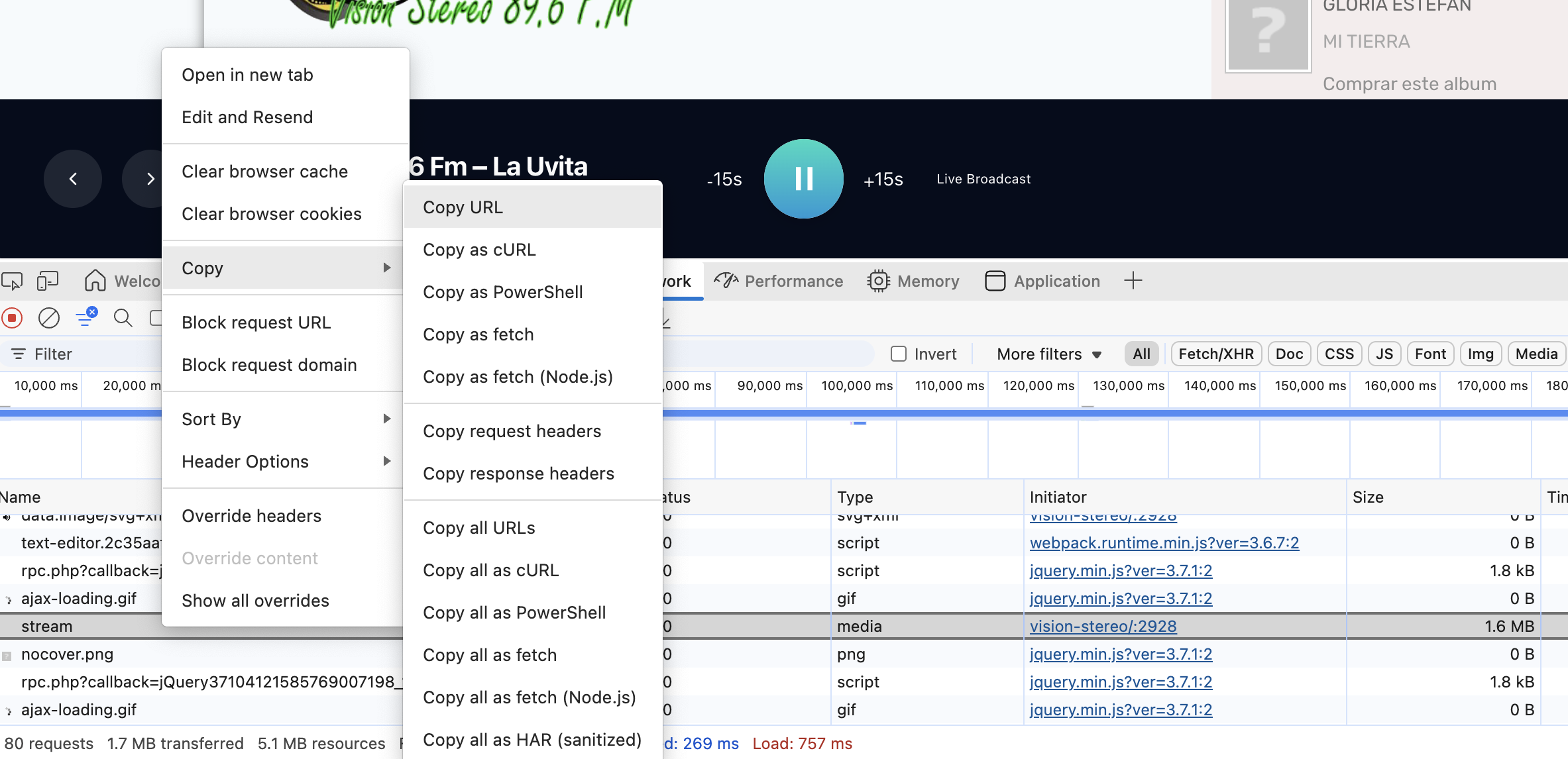
The copied URL is the direct stream address you can use with FFmpeg.
Receiving Radio with FFmpeg
Section titled “Receiving Radio with FFmpeg”Astra doesn’t support the ICY protocol directly. However, you can receive radio streams using FFmpeg to convert them into a format Astra can work with.
Use FFmpeg to receive an ICY stream and output it as UDP that Astra can receive:
ffmpeg -i http://radio.example.com:8000/stream -c copy -f mpegts 'udp://127.0.0.1:15001?pkt_size=1316'Then configure Astra to receive from this UDP address:
udp://127.0.0.1:15001Running FFmpeg as a Service
Section titled “Running FFmpeg as a Service”To keep FFmpeg running continuously, you can set it up as a systemd service.
Create file /etc/systemd/system/radio-name.service with the following content:
[Unit]Description=Forward Radio Name to AstraAfter=network-online.targetWants=network-online.target
[Service]Type=simpleExecStart=/usr/bin/ffmpeg \    -hide_banner -loglevel warning -nostats \    -timeout 5000000 \    -reconnect 1 -reconnect_streamed 1 -reconnect_delay_max 5 \    -re \    -i https://radio-stream:7378 \    -c:a copy \    -f mpegts 'udp://127.0.0.1:15001?pkt_size=1316'
Restart=alwaysRestartSec=5
StandardOutput=nullStandardError=journal
[Install]WantedBy=multi-user.target
Replace in this file:
- File Name: use instead
radio-name.servicea relevant name to the radio station (if you have multiple services) - Description: change
Radio Nameto the name of the radio station - Stream URL: replace
https://radio-stream:7378with the actual stream URL of the radio station - UDP Port: change
15001to the UDP port you want to use
After creating the service file, enable and start the service with:
systemctl enable radio-namesystemctl start radio-nameTo stop the service, use:
systemctl stop radio-nameTo disable it from starting on boot, use:
systemctl disable radio-nameConfigure Astra
Section titled “Configure Astra”Finally, configure Astra to receive the UDP stream by adding a new input with the address:
udp://127.0.0.1:15001